Coolest Guides on the Planet

coolest guides on the planet

Coolest Guides On The Planet

  • Home
  • macOS
  • WebDev
  • All Posts
  • Contact

Redirecting HTTP to HTTPS on OS X 10.6 Server Snow Leopard

March 2, 2011 4 Comments

You should be able to redirect HTTP to HTTPS using Server Admin and the Aliases and Redirect options in the Web Service for the site in question, have your initial web site set up to share over Port 80, duplicate it using the duplicate option, on the duplicate option switch the port number to 443 by checking the “Enable SSL” in the security tab then delete the word “copy from the domain. Restart the service.

Click the site on Port 80, go to the Aliases tab, click on the plus tab of  “Aliases and Redirects” – add in a Redirect with a pattern of / to https://server.test.com
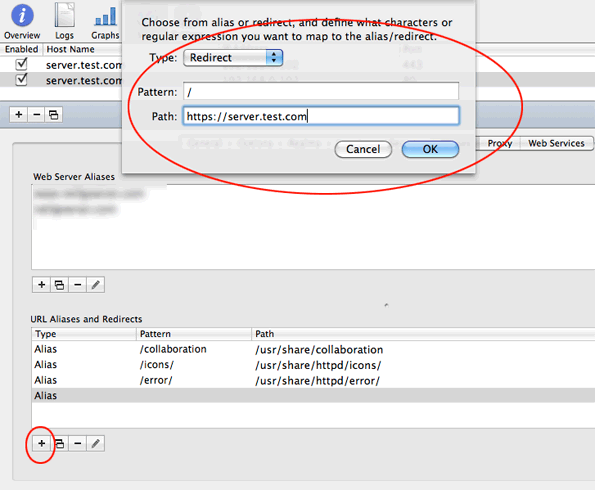
add a redirect to HTTPS

add a redirect to HTTPS

This will then add in the redirect for anything that hits the Port 80 regular HTTP and force it over to HTTPS.
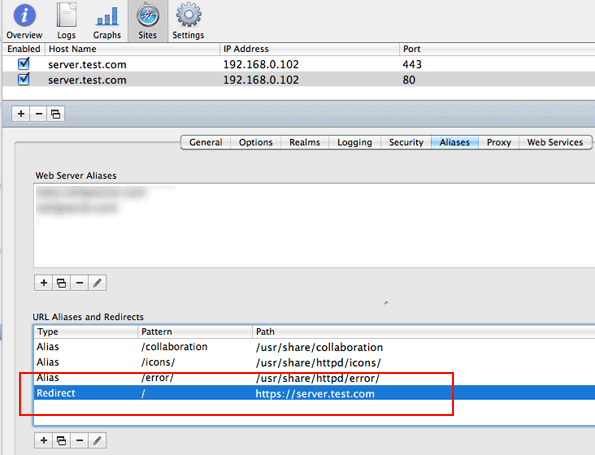
shows the redirect in place

shows the redirect in place


Sometimes the redirect tools don’t always work and you may need to edit the apache site config file to force a HTTP connection to HTTPS.

Same initial procedure applies, in server admin have your initial web site set up to share over Port 80, duplicate it using the duplicate option below. On the duplicate option switch the port number to 443 by checking the “Enable SSL” in the security tab then delete the word “copy from the domain. Restart the service.
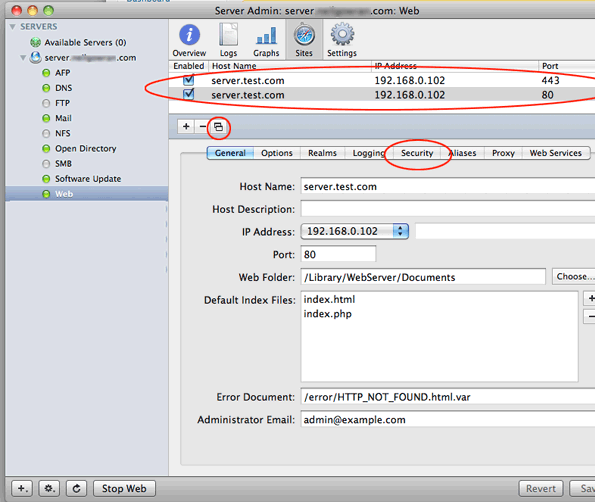
 

http-redirection-osx-server

Server Admin configuration

Then in your favourite text editor via command line or GUI (I like Text Wrangler) with admin access, edit the HTTP sites configuration file, filed on Snow Leopard Server at:

/etc/apache2/sites

0001_192.168.0.102_80_server.test.com.conf – (your equivalent 🙂

and add in anywhere between the Virtual Host tag:

RedirectPermanent / https://test.com/

Should be good to go !!


Cats: macOS, WebRoot Tags: apache, http, https, leopard, OSX, redirect, snow

Tags

3gs 10.6 apache backup baseband boot clean urls cpanel css curl custom database drupal el capitan git Google image instadmg ios iphone jailbreak keys lion mac macos mojave macos sierra menu mysql OSX panda php phpmyadmin private public redirect redsn0w remote rsa SEO shell ssh terminal unstoppables upgrade urls

Donate a Beer to the Coolest Guides

Get Beaver Builder Now!

Discuss

3gs 10.6 apache backup baseband boot clean urls cpanel css curl custom database drupal el capitan git Google image instadmg ios iphone jailbreak keys lion mac macos mojave macos sierra menu mysql OSX panda php phpmyadmin private public redirect redsn0w remote rsa SEO shell ssh terminal unstoppables upgrade urls
Get DesktopServer

Lynda

Lynda.com Online Training Videos

TreeHouse

smlinks

Learn WordPress
osx-modify-shell-path

How to Add to the Shell Path in macOS Big Sur and Catalina using Terminal

October 19, 2019

virtual-hosts osx 10.10 yosemite

Set up Virtual Hosts on macOS Catalina 10.15 in Apache

October 19, 2019

Installing Homebrew on macOS Catalina 10.15, Package Manager for Linux Apps

October 18, 2019

Where is the bash shell in macos Catalina?

October 12, 2019

Refine your search

  • All
  • Modules
  • Themes
  • Documentation
  • Forums & Issues
  • Groups

RSS feed: ars technica ars technica

  • Apple's long-rumored foldable becomes reality with the $2,000 iPhone Duo
  • Apple debuts $129 AirPods 5 with better noise cancellation and transparency mode
  • Apple's iPhone 18 Pro adds variable camera aperture and a more powerful chip
  • Apple One and Apple TV subscription prices increase by up to 20 percent
  • Vulnerability giving attackers full control of Macs is under active exploitation

RSS feed: mac surfer mac surfer

  • iPhone Duo vs iPhone 18 Pro: Which Should You Buy?
  • Apple Eyes Ads Inside Visual Intelligence in iOS 27
  • Post-Launch A20 Pro Benchmarks Show Real-World Gains
  • Commentators Weigh In on iPhone Duo's Promise
  • iPhone 18 Pro vs iPhone 17 Pro: Worth Upgrading?

Donate

Copyright © 2026· Neil Gee - All Rights Reserved - Hosted by Runcloud

Copyright © 2026 · gee on Genesis Framework · WordPress · Log in