Coolest Guides on the Planet

coolest guides on the planet

Coolest Guides On The Planet

  • Home
  • macOS
  • WebDev
  • All Posts
  • Contact

Make A Bootable USB Disk of macOS Sierra

July 17, 2016 2 Comments

This guide deals with how to make a bootable USB disk of macOS Sierra, see this guide for older operating systems OSX 10.11 El Capitan, 10.10 Yosemite  or 10.9 Mavericks. This is possible via the Terminal App from a command Apple introduced since OSX Lion, called createinstallmedia, all you need is the original macOS Sierra app installer and a spare external drive to make a copy of the new OS installer on which you will be able to boot from.

This guide is initially for the Public Beta of macOS Sierra which is available here.


Getting the macOS Sierra Installer App
macos-sierra-boot-disk

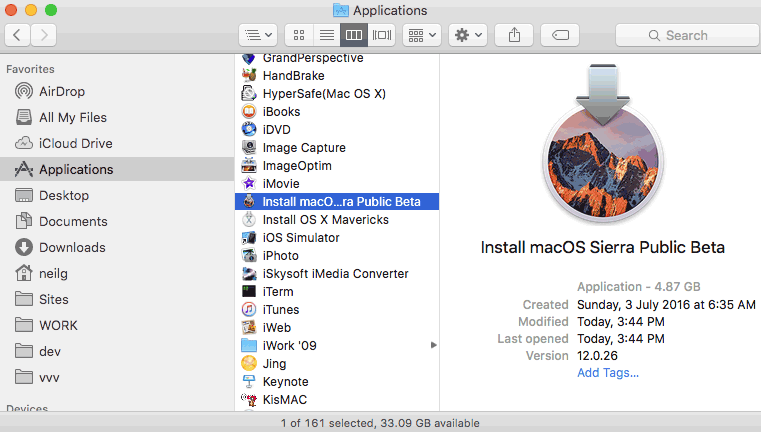
Sign up for the Public Beta, click the redeem button and download via the App store, once you download it should be in your top level Applications folder.

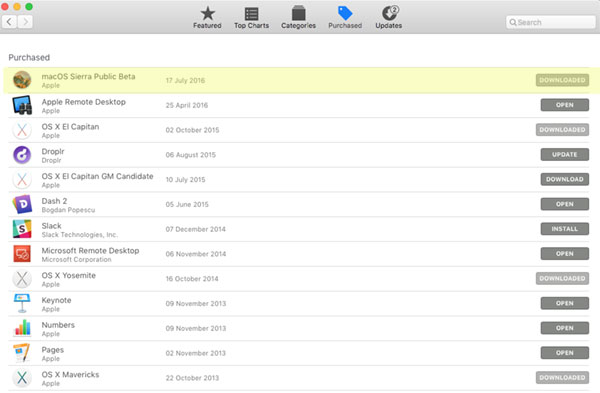
If it’s not there check in your purchased tab of the App Store app and you can click Download.
macos-sierra-app-store


If in the instance it already says ‘Downloaded’ and it’s not in your /Applications folder, first of all try a search on your machine for it, if still no go, launch LaunchPad in Applications and find the installer, in this instance ‘Install macOS Sierra Public Beta’ and move to the Trash – now you should be able to download from the App Store app.

Attach your USB external stick/drive.

Launch the Terminal from /Applications/Utilities and enter the command below and then your password when prompted, be sure to change the ‘MyVolume‘ name in the below command to your external disk name.

macOS Sierra ~ Terminal Command

sudo /Applications/Install\ macOS\ Sierra\ Public\ Beta.app/Contents/Resources/createinstallmedia --volume /Volumes/MyVolumeName/ --applicationpath /Applications/Install\ macOS\ Sierra\ Public\ Beta.app/
macos-sierra-terminal-output

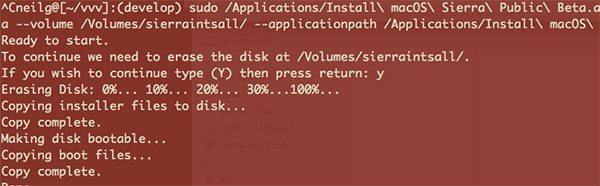
Let it do its thing and it will say done when complete, there you have it one bootable macOS Sierra drive.

Cats: Imaging, macOS, Operating Systems, Tech Tags: macos sierra

Tags

3gs 10.6 apache backup baseband boot clean urls cpanel css curl custom database drupal el capitan git Google image instadmg ios iphone jailbreak keys lion mac macos mojave macos sierra menu mysql OSX panda php phpmyadmin private public redirect redsn0w remote rsa SEO shell ssh terminal unstoppables upgrade urls

Donate a Beer to the Coolest Guides

Get Beaver Builder Now!

Discuss

3gs 10.6 apache backup baseband boot clean urls cpanel css curl custom database drupal el capitan git Google image instadmg ios iphone jailbreak keys lion mac macos mojave macos sierra menu mysql OSX panda php phpmyadmin private public redirect redsn0w remote rsa SEO shell ssh terminal unstoppables upgrade urls
Get DesktopServer

Lynda

Lynda.com Online Training Videos

TreeHouse

smlinks

Learn WordPress
osx-modify-shell-path

How to Add to the Shell Path in macOS Big Sur and Catalina using Terminal

October 19, 2019

virtual-hosts osx 10.10 yosemite

Set up Virtual Hosts on macOS Catalina 10.15 in Apache

October 19, 2019

Installing Homebrew on macOS Catalina 10.15, Package Manager for Linux Apps

October 18, 2019

Where is the bash shell in macos Catalina?

October 12, 2019

Refine your search

  • All
  • Modules
  • Themes
  • Documentation
  • Forums & Issues
  • Groups

RSS ars technica

  • Apple confirms that its Maps app will begin showing ads to users "this summer"
  • Apple will talk iOS 27, macOS 27, and more at WWDC 2026 on June 8
  • Despite hardware limits, Parallels supports running Windows on MacBook Neo
  • Apple can delist apps "with or without cause," judge says in loss for Musi app
  • Apple’s AirPods Max 2 bring H2 chip, boosted ANC in April for $549

RSS mac surfer

  • Apple Updates App Store Connect Analytics Platform
  • macOS Tahoe 26.4 Update Released
  • watchOS 26.4 Update Released
  • tvOS 26.4 Update Released
  • visionOS 26.4 Update Released

Donate

Copyright © 2026· Neil Gee - All Rights Reserved - Hosted by Runcloud

Copyright © 2026 · gee on Genesis Framework · WordPress · Log in