Coolest Guides on the Planet

coolest guides on the planet

Coolest Guides On The Planet

  • Home
  • macOS
  • WebDev
  • All Posts
  • Contact

Add a Facebook Like Box HTML5 style to Genesis Child Theme (Responsively)

March 19, 2014 3 Comments

How to add a HTML5 version Facebook Like Box  to a Genesis Child Theme and make it responsive…

Facebook Code

Get you facebook code and choose the HTML5 version.
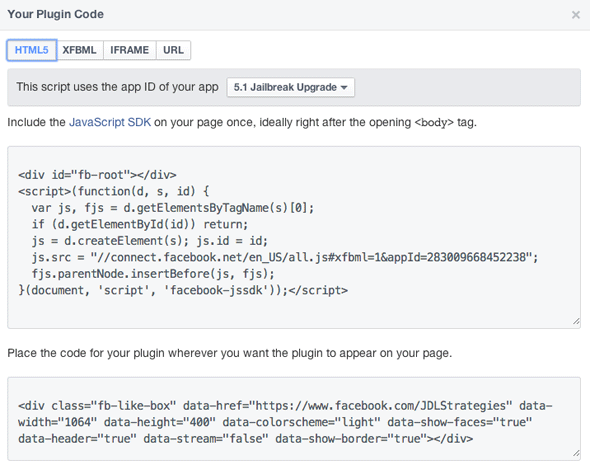
feacebook-html5-code-likebox

The bottom HTML code goes in your sidebar widget or where ever you want the Facebook like box to go, the top javascript code needs to go after the opening body tag in the HTML mark up.

Adding the HTML5 Facebook Javascript Code in Genesis

You can add in the javascript by declaring a function and an action to your Genesis Child Theme functions.php file

//Facebook Like Box
function gee_facebook_like () {
	echo '<div id="fb-root"></div>
	 <script>(function(d, s, id) {
	  var js, fjs = d.getElementsByTagName(s)[0];
	  if (d.getElementById(id)) return;
	  js = d.createElement(s); js.id = id;
	  js.src = "//connect.facebook.net/en_US/all.js#xfbml=1&appId=283009668452238";
	  fjs.parentNode.insertBefore(js, fjs);
	}(document, \'script\', \'facebook-jssdk\'));</script>';
}

add_action('genesis_before','gee_facebook_like');

One thing to note is that create the function with a unique name and  echo the javascript  between a pair of quotes ‘ ‘, any quotes inside of the javascript code need to be escaped with a backslash \

The genesis_before action will place the script straight after the opening body tag…

 Making It Responsive

To make the Facebook Like Responsive add the CSS below

.fb_iframe_widget {
	display: block !important;
}

.fb-like-box iframe {
 	width: 100% !important;
}

.fb-like-box span {
	width: auto !important;
	position: initial !important;
}
.fb_iframe_widget_fluid span {
	width:100% !important;
}
.fb_iframe_widget span {
	position: static !important;
}

This CSS has been updated recently as FB changed some of the CSS iframe code.


Cats: CSS, WordPress

Tags

3gs 10.6 apache backup baseband boot clean urls cpanel css curl custom database drupal el capitan git Google image instadmg ios iphone jailbreak keys lion mac macos mojave macos sierra menu mysql OSX panda php phpmyadmin private public redirect redsn0w remote rsa SEO shell ssh terminal unstoppables upgrade urls

Donate a Beer to the Coolest Guides

Get Beaver Builder Now!

Discuss

3gs 10.6 apache backup baseband boot clean urls cpanel css curl custom database drupal el capitan git Google image instadmg ios iphone jailbreak keys lion mac macos mojave macos sierra menu mysql OSX panda php phpmyadmin private public redirect redsn0w remote rsa SEO shell ssh terminal unstoppables upgrade urls
Get DesktopServer

Lynda

Lynda.com Online Training Videos

TreeHouse

smlinks

Learn WordPress
osx-modify-shell-path

How to Add to the Shell Path in macOS Big Sur and Catalina using Terminal

October 19, 2019

virtual-hosts osx 10.10 yosemite

Set up Virtual Hosts on macOS Catalina 10.15 in Apache

October 19, 2019

Installing Homebrew on macOS Catalina 10.15, Package Manager for Linux Apps

October 18, 2019

Where is the bash shell in macos Catalina?

October 12, 2019

Refine your search

  • All
  • Modules
  • Themes
  • Documentation
  • Forums & Issues
  • Groups

RSS feed: ars technica ars technica

  • Apple One and Apple TV subscription prices increase by up to 20 percent
  • Vulnerability giving attackers full control of Macs is under active exploitation
  • OpenAI says Apple's trade secrets lawsuit is "aggressive and oddly personal"
  • Tim Cook passes the baton in Apple's Q3 2026 earnings call
  • San Francisco orders Apple, Google to remove nudify apps from app stores

RSS feed: mac surfer mac surfer

  • Mac App Store Lets Developers Drop Intel Support
  • Ternus Sends First CEO Memo, Teases iPhone Launch
  • Apple CEO John Ternus Joins X With 'Hello' Post
  • John Ternus Takes Over as Apple CEO
  • Apple Files New Evidence in OpenAI Trade Secret Suit

Donate

Copyright © 2026· Neil Gee - All Rights Reserved - Hosted by Runcloud

Copyright © 2026 · gee on Genesis Framework · WordPress · Log in