Coolest Guides on the Planet

coolest guides on the planet

Coolest Guides On The Planet

  • Home
  • macOS
  • WebDev
  • All Posts
  • Contact

Add a Submit Button to the Search Input Field in Genesis Search Widget

June 11, 2014 1 Comment

By default the Search widget in a Genesis WordPress theme does not have a submit button, just hitting enter on the keyboard will do the trick but what if you deadset want that clickable submit button back.
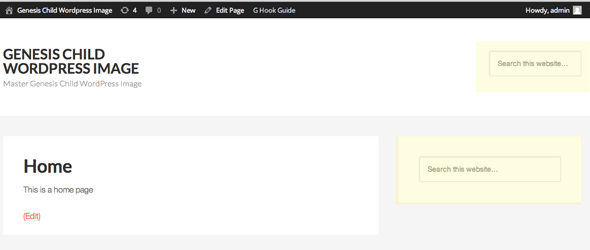
genesis-search-widget

Using the Genesis Sample Theme, this is how the search widget looks like when added in the Header Right and Primary Sidebar widget areas. The actual HTML markup for the submit button is there in the source code, it’s just hidden by CSS rules.

To get the Submit search button back you need to add some CSS to your style.css file:

.search-form {
	overflow:auto;
}

.search-form input[type="search"] {
	width: 64%;
	float: left;
	-webkit-appearance: none;
}

.search-form input[type="submit"] {
	position: relative;
	display: inline-block;
	padding: 13px;
	margin-top: 3px;
	margin-left: 10px;	
	width: 90px;	
	height: auto;
	clip: auto;
	text-align: center;
	background-color: #666;	
	transition-property: opacity;
	transition-delay: .3s;
	transition-duration: .5s;	
}

.search-form input[type="submit"]:hover {
	opacity: .7; 
}


@media only screen and (max-width: 1023px) {
	.site-header .search-form  {
		text-align: left;
		padding-left: 5%;
		padding-right: 5%;
	}
	.search-form input[type="search"] {
		width: 70%;
	}
}
@media only screen and (max-width: 320px) {
	.search-form input[type="search"] {
		width: 55%;
	}
}

For the media query @media rules, ensure these are placed after any existing ones – or just paste the whole thing at the end of style.css file.

The above CSS will make the search input and submit button sit on the same row and allows for desktop/mobile use.
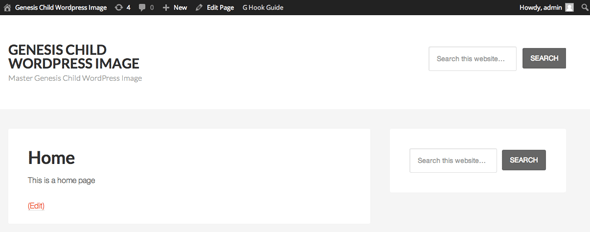
genesis-search-widget-submit

Desktop View


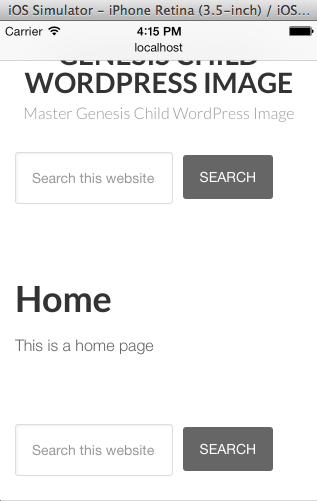
Mobile View

Mobile View

You’ll just need to tweak the background-color CSS property or add CSS font declarations to match your design.


Cats: CSS, WordPress

Tags

3gs 10.6 apache backup baseband boot clean urls cpanel css curl custom database drupal el capitan git Google image instadmg ios iphone jailbreak keys lion mac macos mojave macos sierra menu mysql OSX panda php phpmyadmin private public redirect redsn0w remote rsa SEO shell ssh terminal unstoppables upgrade urls

Donate a Beer to the Coolest Guides

Get Beaver Builder Now!

Discuss

3gs 10.6 apache backup baseband boot clean urls cpanel css curl custom database drupal el capitan git Google image instadmg ios iphone jailbreak keys lion mac macos mojave macos sierra menu mysql OSX panda php phpmyadmin private public redirect redsn0w remote rsa SEO shell ssh terminal unstoppables upgrade urls
Get DesktopServer

Lynda

Lynda.com Online Training Videos

TreeHouse

smlinks

Learn WordPress
osx-modify-shell-path

How to Add to the Shell Path in macOS Big Sur and Catalina using Terminal

October 19, 2019

virtual-hosts osx 10.10 yosemite

Set up Virtual Hosts on macOS Catalina 10.15 in Apache

October 19, 2019

Installing Homebrew on macOS Catalina 10.15, Package Manager for Linux Apps

October 18, 2019

Where is the bash shell in macos Catalina?

October 12, 2019

Refine your search

  • All
  • Modules
  • Themes
  • Documentation
  • Forums & Issues
  • Groups

RSS ars technica

  • Say hi to "Siri AI"—Apple announces new, more "conversational" voice assistant
  • Apple working to cram massive Gemini model into iPhone to power new Siri
  • OpenAI feels “burned” by Apple’s crappy ChatGPT integration, insiders say
  • Desperate Trump taps "Tim Apple," Jensen Huang, Elon Musk to attend Xi summit
  • Court rules Trump's 10% tariff is just as illegal as the tariff it replaced

RSS mac surfer

  • iOS 27 Beta Reveals Foldable iPhone Framework Hints
  • Siri AI Draws Reactions, Skepticism After Launch
  • Siri AI Gains Customizable Voice in iOS 27
  • Apple Announces tvOS 27 for Apple TV
  • Tim Cook Delivers Farewell at Final WWDC Keynote

Donate

Copyright © 2026· Neil Gee - All Rights Reserved - Hosted by Runcloud

Copyright © 2026 · gee on Genesis Framework · WordPress · Log in