PEAR is a popular PHP package manager, it doesn’t come by default on OSX, here is a tutorial how to install PEAR on OSX 10.11 El Capitan and earlier versions of OSX including Yosemite and Mavericks.
These commands need to be entered via the command line so crank open your Terminal application.
First up
Move into your home directory
cd
Check if you have it
pear version
If not, get it
curl -O http://pear.php.net/go-pear.phar
Install Pear
php -d detect_unicode=0 go-pear.phar
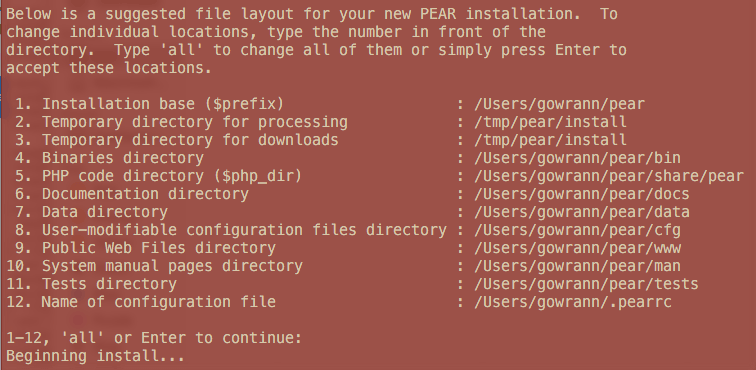
The installation will suggest the file locations for you and these will be based on your home directory (older versions of pear installed these in a system wide location of /usr/local) – but if its just you using this then the defaults are fine – just click enter.
Add PEAR to your PATH
Next up is to add pear to your shell path, you can add this in your .bash_profile which is an invisible file in your home directory
cd
nano .bash_profile
Add to your PATH variable:
/Users/USERNAME/pear/bin
So the PATH variable line will look something like this, each path is separated by a colon and finished with the variable $PATH, in the example below the pear path is the 2nd one
export PATH="/usr/local/mysql/bin:/Users/USERNAME/pear/share/pear/:$PATH"
Refresh the profile
source .bash_profile
Verify
pear version
Output should be
PEAR Version: 1.10.1
PHP Version: 5.5.5
Zend Engine Version: 2.5.0
Running on: Darwin 192-168-1-9.tpgi.com.au 15.3.0 Darwin Kernel Version 15.3.0: Thu Dec 10 18:40:58 PST 2015; root:xnu-3248.30.4~1/RELEASE_X86_64 x86_6
Add PEAR to your PHP
As well as adding pear to your shell path you also have to add the pear location to your PHP installation so you can run the PEAR binaries, which is done via your php.ini file.
If your OSX install has not been customised it will be in /etc and maybe named php.ini.default which you will need to duplicate and just name php.ini – if your PHP is somewhere else find it by adding in on the command line…
php --ini
In this example I have a different PHP path
Configuration File (php.ini) Path: /usr/local/php5/lib
Loaded Configuration File: /usr/local/php5/lib/php.ini
Anyway when you get it, open it and under ‘Paths and Directories’ add into the php.ini file…
include_path = ".:/Users/YOURUSERNAME/pear/share/pear/"
Now you can work with your PEAR packages, below are some basic commands…
To list your PEAR packages
pear list
Output should be similar to:
Installed packages, channel pear.php.net:
=========================================
Package          Version State
Archive_Tar      1.4.0   stable
Console_Getopt   1.4.1   stable
PEAR             1.10.1  stable
Structures_Graph 1.1.1   stable
XML_Util         1.3.0   stable
To install a PEAR package, for example PHP_codesniffer, run
pear install PHP_codesniffer
To upgrade PEAR
pear upgrade pear
To upgrade PEAR packages either name the package name after the command or to upgrade all just run
pear upgrade
To remove a PEAR package
pear uninstall PHP_CodeSniffer