Coolestguidesontheplanet.com | Neil Gee

coolest guides on the planet

Coolest Guides On The Planet

Neil Gee

  • Home
  • macOS
  • WebDev
  • All Posts
  • Contact

Is Your Mac Good Enough to take on Yosemite?

June 8, 2014 Leave a Comment

Apple will release their new operating system OS X 10.10 Yosemite between September-November this year.
macs running on yosemite


At this stage of the game the new OSX will run on pretty much the same machines as its predecessor OSX 10.9 Mavericks. You’ll need a 64bit Intel processor, 8GBs of free disk space – if upgrading as appose to clean install min. of OSX 10.6.7 required plus 2GB of RAM.

The Good

  • iMac – all models from mid 2007, iMac 7,1 – 12,1
  • MacBook 5,1 – 7,1
  • MacBook Pro  3,1 – 8,3
  • MacBookAir 2,1 – 4,2
  • Mac Mini 3,1 – 5,3
  • Mac Pro  3,1 – 5,1
  • Xserve 3,1

Which means most devices made prior to 2008 won’t be able to run it.

The Bad

– OS X 10.10 Yosemite won’t run on –

  • iMac 4,1 – 6,1
  • MacBook  1,1 – 4,1
  • MacBook Pro 1,1 – 2,1
  • MacBookAir 1,1
  • Mac Mini 1,1 – 2,1
  • Mac Pro  1,1 – 2,1
  • Xserve  1,1 – 2,1

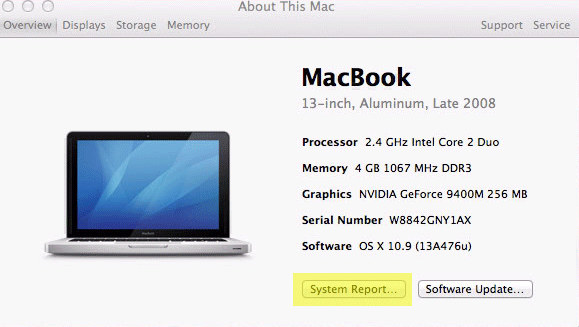
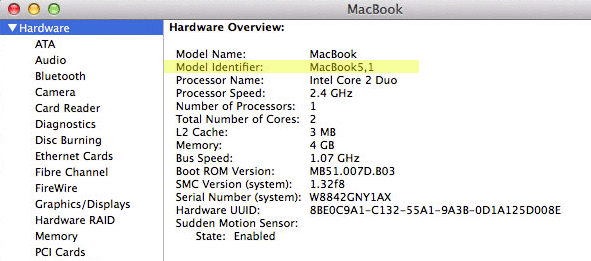
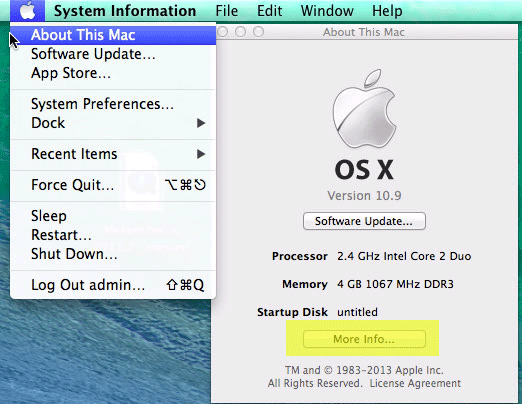
How you find your Mac Model Number
get-info-apple-version

apple-hardware-system

apple-model-identifier

>Apple Menu > About This Mac > More Info … > System Report … Model Identifier


Or for you terminal freaks…

system_profiler SPHardwareDataType

Share this:

  • Twitter
  • Google
  • Facebook

Related

Cats: macOS, Operating Systems, Tech

Subscribe

Coolest Guides on the Planet
  • Latest
  • Popular
  • Comments
  • Installing Homebrew on macOS Sierra, Package Manager for Unix Apps Installing Homebrew on macOS Sierra, Package Manager for Unix Apps
  • Get Apache, MySQL, PHP and phpMyAdmin working on macOS Sierra Get Apache, MySQL, PHP and phpMyAdmin working on macOS Sierra
  • How to Change the MySQL root Password in Linux or macOS via Command Line How to Change the MySQL root Password in Linux or macOS via Command Line
  • iOS IPSW Firmware Download Links 10.0.2, 10.0.0, 9.3.5, 9.3.4, 9.3.3, 9.3.2, 9.3.1, 9.3.0, 9.2.1, 9.2.0, 9.1.0, 9.0.2, 9.0.1, 9.0.0, 8.4.1, 8.4, 8.3, 8.2, 8.1.3, 8.1.2, 8.1.1, 8.1.0, 8.0.2, 8.0.1, 8, 7.1.2, 7.1.1, 7.1, 7.0.6, 7.0.5, 7.0.4, 7.0.3, 7.0.2, 7.0.1, 7, 6.1.3, 6.1.2, 6.1, 6.0.1, 6, 5.1.1, 5.1, 5.0.1 iOS IPSW Firmware Download Links 10.0.2, 10.0.0, 9.3.5, 9.3.4, 9.3.3, 9.3.2, 9.3.1, 9.3.0, 9.2.1, 9.2.0, 9.1.0, 9.0.2, 9.0.1, 9.0.0, 8.4.1, 8.4, 8.3, 8.2, 8.1.3, 8.1.2, 8.1.1, 8.1.0, 8.0.2, 8.0.1, 8, 7.1.2, 7.1.1, 7.1, 7.0.6, 7.0.5, 7.0.4, 7.0.3, 7.0.2, 7.0.1, 7, 6.1.3, 6.1.2, 6.1, 6.0.1, 6, 5.1.1, 5.1, 5.0.1
  • Setting up a Local Development WordPress Environment on Mac OSX Setting up a Local Development WordPress Environment on Mac OSX
  • Today Week Month All
  • Jetpack plugin with Stats module needs to be enabled.
  • Today Week Month All
  • Sorry. No data yet.
Ajax spinner

Tags

apache backup baseband Bing boot Coolest Guy on the Planet Coolest Guy Planet cpanel css custom database drupal error Firmware Google image instadmg ios iphone jailbreak keys Keywords lion mac macos sierra mysql OSX PageRank php private public Rank Rank Checker ranking redirect remote rsa SEO SERPS shell ssh terminal Twitter unstoppables Yahoo
WordPress Workflow
Get DesktopServer
StudioPress Premium WordPress Themes

Donate a Beer to the Coolest Guides

Copyright © 2016· Neil Gee - All Rights Reserved - Hosted by Servint