Coolest Guides on the Planet

coolest guides on the planet

Coolest Guides On The Planet

  • Home
  • macOS
  • WebDev
  • All Posts
  • Contact

Set Clean URL Permalinks in WordPress

February 13, 2011 1 Comment

What are Permalinks in WordPress? How to you change them to be Search Engine Friendly?

Clean Healthy Permalink URLs in WordPress

After you have made your blog visible to the world the next thing to do (or actually preferably before!) is to change the permalink structure in WordPress.

Universal WordPress URL Setting

Permalink is short for Permanent Links and this is a typical URL like http://www.coolestguyplanent.net/importantkeyword/index.html – this is great and all that and search engines can find and index these pages and the words used in the link which will have a bearing on search results displayed.

Out of the box WordPress does not confirm to this protocol, rather it takes a dynamic style URL which is indicated by the use of a ?, this is because of nature of the backend which supports dynamic driven web pages from databases and is more like:

http://coolestguidesontheplanet.com/?p=123

This does not display any directory nor post or page titles in the URL so therefore isn’t ideal for search engines. This is unfortunately the default behaviour of WordPress.

You do have an option to change the format, in your WordPress backend go to the Settings tab and then Permalinks option – click Custom Structure and either enter:

/%Category%/%postname%/

or

/%postname%/

This will then change your URLs to:

http://www.coolestguyplanent.net/category/postname/

or

http://www.coolestguyplanent.net/postname/

My personal preference is to go with just /%postname%/
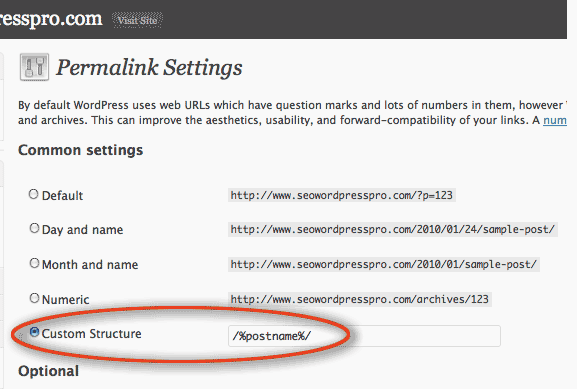
change-permalinks-wordpress

change url permalinks in WordPress


If you prefer not to use a custom structure at the very least change it from the default to the 2nd option in the list which is the day and name, here your URL will include and year month and date and post title all in the URL, at least you get to use your page/post title which maybe the words you are using to target results.

Individual WordPress URL Setting

One other area to change the URL of each post is in the post page itself next to the Permalink is an edit button which you can manually set the URL , this is great as if your post title is too long you can shorten the permalink or change it entirely.

edit individual WordPress URL permalink

edit individual WordPress URL permalink

Cats: SEO, WordPress Tags: engine, links, permalinks, search, url

Tags

3gs 10.6 apache backup baseband boot clean urls cpanel css curl custom database drupal el capitan git Google image instadmg ios iphone jailbreak keys lion mac macos mojave macos sierra menu mysql OSX panda php phpmyadmin private public redirect redsn0w remote rsa SEO shell ssh terminal unstoppables upgrade urls

Donate a Beer to the Coolest Guides

Get Beaver Builder Now!

Discuss

3gs 10.6 apache backup baseband boot clean urls cpanel css curl custom database drupal el capitan git Google image instadmg ios iphone jailbreak keys lion mac macos mojave macos sierra menu mysql OSX panda php phpmyadmin private public redirect redsn0w remote rsa SEO shell ssh terminal unstoppables upgrade urls
Get DesktopServer

Lynda

Lynda.com Online Training Videos

TreeHouse

smlinks

Learn WordPress
osx-modify-shell-path

How to Add to the Shell Path in macOS Big Sur and Catalina using Terminal

October 19, 2019

virtual-hosts osx 10.10 yosemite

Set up Virtual Hosts on macOS Catalina 10.15 in Apache

October 19, 2019

Installing Homebrew on macOS Catalina 10.15, Package Manager for Linux Apps

October 18, 2019

Where is the bash shell in macos Catalina?

October 12, 2019

Refine your search

  • All
  • Modules
  • Themes
  • Documentation
  • Forums & Issues
  • Groups

RSS feed: ars technica ars technica

  • Apple Mac mini review: The new M6 impresses, but the price hike is rough
  • Apple reportedly building server packed with M-series Ultra chips for AI
  • macOS 27 Golden Gate: The Ars Technica review
  • OpenAI stuck fighting Musk antitrust suit after Apple finds a way out
  • Apple releases iOS 27, macOS Golden Gate 27 with Siri AI and Liquid Glass refinements

RSS feed: mac surfer mac surfer

  • OpenAI Says ChatGPT in Siri Dramatically Underperformed
  • Siri AI Headed to HomePod, Code Reveals
  • Apple Card Savings Rate Rises to 3.5%
  • Apple Seeds iOS 27.2 First Public Betas
  • Apple Tests Whoop-Style Screenless Fitness Band

Donate

Copyright © 2026· Neil Gee - All Rights Reserved - Hosted by Runcloud

Copyright © 2026 · gee on Genesis Framework · WordPress · Log in