Coolest Guides on the Planet

coolest guides on the planet

Coolest Guides On The Planet

  • Home
  • macOS
  • WebDev
  • All Posts
  • Contact

Switching Primary Menu in Genesis Theme to Header Right on a Permanent Basis

May 3, 2014 Leave a Comment

I find that I always, well most of the time, use the header right widget area in Genesis for the Primary Menu of a site and create this menu by adding a Custom Menu to the Header Widget Area, whilst there is nothing wrong by doing it this way, there is a better way.

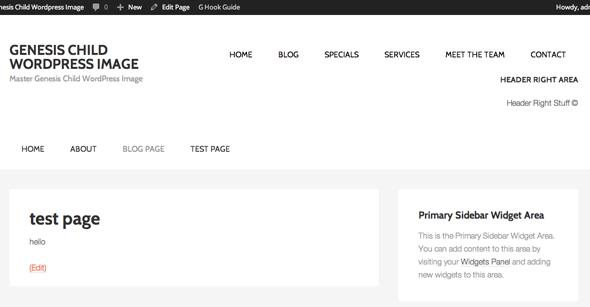
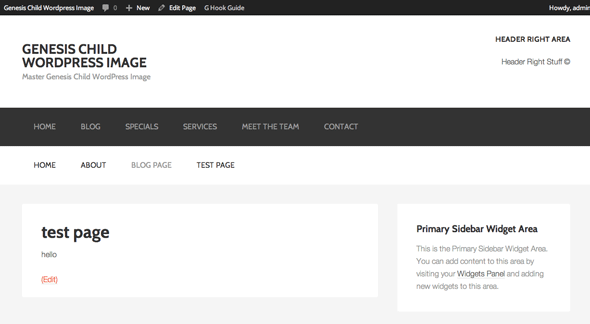
Here is a guide how to place the Primary Menu in the Header Widget Area by just moving its location there permanently via a Genesis hook. The benefit of doing this is that out of the box the location is set and you have more functionality with registered menus.  So to go from this…
 

genesis-primary-default-location

To this…

genesis-primary-header-right-location

All the code goes in the themes function.php file

You can actually just add the remove_action and add_action functions at the beginning of the code and that alone will reposition the menu. The remove_action moves the menu away completely and the add_action adds it to the new location.

But I also want to modify the output of the menu by removing the wrap element it has by default. This is done by the add_filter function which calls the function below it which in turn modifies or filters attributes of the menu, here just a couple of lines of the original code are left out, lines 89-91 of menu.php in the structure directory.


Add in some CSS

Add to your style.css which reverses the colors of the original menu and also sets the last link to have no padding so it sits flush right and aligns with the content below it.

.nav-primary {
	background-color:#fff;
}
.nav-primary li a{
	color:#000;
}
.nav-primary a:hover, .nav-primary .current-menu-item > a {
	color:#666;
}
.nav-primary a:last-of-type {
	padding-right:0px;
}


Cats: WordPress

Tags

3gs 10.6 apache backup baseband boot clean urls cpanel css curl custom database drupal el capitan git Google image instadmg ios iphone jailbreak keys lion mac macos mojave macos sierra menu mysql OSX panda php phpmyadmin private public redirect redsn0w remote rsa SEO shell ssh terminal unstoppables upgrade urls

Donate a Beer to the Coolest Guides

Get Beaver Builder Now!

Discuss

3gs 10.6 apache backup baseband boot clean urls cpanel css curl custom database drupal el capitan git Google image instadmg ios iphone jailbreak keys lion mac macos mojave macos sierra menu mysql OSX panda php phpmyadmin private public redirect redsn0w remote rsa SEO shell ssh terminal unstoppables upgrade urls
Get DesktopServer

Lynda

Lynda.com Online Training Videos

TreeHouse

smlinks

Learn WordPress
osx-modify-shell-path

How to Add to the Shell Path in macOS Big Sur and Catalina using Terminal

October 19, 2019

virtual-hosts osx 10.10 yosemite

Set up Virtual Hosts on macOS Catalina 10.15 in Apache

October 19, 2019

Installing Homebrew on macOS Catalina 10.15, Package Manager for Linux Apps

October 18, 2019

Where is the bash shell in macos Catalina?

October 12, 2019

Refine your search

  • All
  • Modules
  • Themes
  • Documentation
  • Forums & Issues
  • Groups

RSS ars technica

  • San Francisco orders Apple, Google to remove nudify apps from app stores
  • Apple sues OpenAI after ex-engineer allegedly used bug to steal trade secrets
  • Apple and Samsung benefit as memory shortage pushes smartphone shipments to historic lows
  • Apple takes Epic fight over app store fees to the Supreme Court
  • Russian citizens told "switch to Android" after Apple blocks key Russian apps

RSS mac surfer

  • iOS 27 Beta 4 Code Reveals Dual-Battery iPhone
  • Apple Seeds iOS 27, macOS 27 Developer Beta 4
  • Apple Releases iOS 26.6, macOS 26.6 Release Candidates
  • Hidden Siri Popover Interface Discovered in macOS 27 Beta
  • Apple Scrapped Two Mac Pro Models Before Discontinuing Line

Donate

Copyright © 2026· Neil Gee - All Rights Reserved - Hosted by Runcloud

Copyright © 2026 · gee on Genesis Framework · WordPress · Log in